
An SEO audit is a structured health check of your website. It shows why pages are not ranking, what is blocking Google from indexing your content and which improvements will have the biggest impact. Whether your traffic has dropped or you are starting a new SEO campaign, an audit should always come first. This guide walks through the same process our team uses, with a checklist you can follow.
What You Need Before You Start
- Google Search Console access, for indexing, performance and Core Web Vitals data.
- Google Analytics 4, to see traffic and conversions.
- A crawler such as Screaming Frog, Sitebulb or the site audit tool in Ahrefs or Semrush.
- PageSpeed Insights for speed testing.
- A spreadsheet to record issues, priority and owner.
Step 1: Check Indexing First
If Google cannot index a page, nothing else matters. In Search Console, open the Pages report and review:
- How many pages are indexed compared with how many should be.
- Reasons for non-indexing, such as “Crawled – currently not indexed”, “Discovered – currently not indexed”, “Duplicate without user-selected canonical”, 404 and noindex.
- Whether your XML sitemap is submitted, loads correctly and lists only live, indexable URLs.
- Your robots.txt file, to make sure important sections are not blocked.
Large numbers of crawled but not indexed pages usually point to thin, duplicate or low-value content rather than a technical fault.
Step 2: Crawl the Site for Technical Issues
Run a full crawl and look for:
- Broken links and 404 pages, internal and external.
- Redirect chains and loops; links should point directly to the final URL.
- Canonical problems, such as pages canonicalising to the wrong URL or inconsistent capitalisation in links.
- Duplicate titles, meta descriptions and H1s.
- Orphan pages with no internal links pointing to them.
- Accidental noindex tags on important pages.
- HTTP and mixed content issues.
Step 3: Review Site Speed and Core Web Vitals
Check the Core Web Vitals report in Search Console and test key templates in PageSpeed Insights. Focus on Largest Contentful Paint (loading), Interaction to Next Paint (responsiveness) and Cumulative Layout Shift (stability). Common fixes include image compression, removing unused plugins and scripts, caching and a CDN.
Step 4: Check Mobile Experience
Google uses the mobile version of your site for ranking. Test important pages on real phones: text should be readable, buttons easy to tap, and no content or links should be missing compared with desktop.
Step 5: Audit On-Page SEO
For every important page, check:
- A unique, descriptive title tag with the main keyword.
- A compelling meta description.
- One clear H1 and a logical heading structure.
- The keyword and related terms used naturally in the content.
- Descriptive image alt text.
- Internal links to and from related pages.
- Clean, readable URLs.
Step 6: Evaluate Content Quality
This is where many audits find the biggest opportunities. Ask:
- Does each page clearly satisfy the search intent?
- Is it more helpful than the pages currently ranking?
- Does it show real experience, examples and expertise?
- Are several posts covering the same topic and competing with each other? If so, merge them and redirect the weaker URLs.
- Is any content outdated, thin or obviously mass-produced?
Step 7: Analyse Backlinks
Review the sites linking to you. Look for relevant, trustworthy links and gaps compared with competitors. Watch for patterns of spammy or paid links, which may be a risk.
Step 8: Check Local SEO (If Relevant)
For local businesses, review your Google Business Profile for accurate categories, services, hours, photos and reviews, and check that your name, address and phone number are consistent across directories and your website.
Step 9: Review Structured Data
Check schema markup such as Organization, LocalBusiness, Article, FAQ, Product and Breadcrumb using Google’s Rich Results Test, and fix any errors reported in Search Console.
Step 10: Prioritise and Create an Action Plan
An audit is only useful if it leads to action. Rank each issue by impact and effort:
- Critical: indexing blockers, broken sitemaps, sitewide noindex, major speed problems.
- High: thin or duplicate content on key pages, missing internal links, canonical errors.
- Medium: on-page improvements, schema, image optimisation.
- Ongoing: content improvements and link building.
SEO Audit Checklist
- Pages report reviewed and indexing issues listed
- Sitemap and robots.txt working
- Crawl completed: 404s, redirects, canonicals, duplicates fixed
- Core Web Vitals and mobile checked
- On-page elements reviewed on key pages
- Thin and overlapping content merged or improved
- Backlink profile reviewed
- Google Business Profile optimised
- Structured data validated
- Prioritised action plan created
Real Results: What Happens After an SEO Audit
An audit only matters if the fixes move the numbers. This is real Google Search Console data from a Digi Opta client site, covering three months (late June to late September 2026) after we audited the site and worked through the action plan.
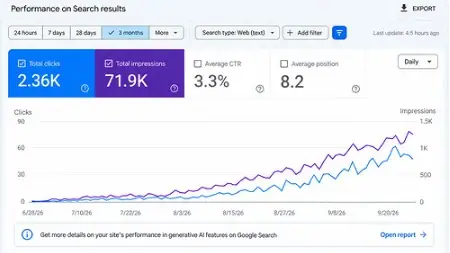
- 2,360 clicks from Google Search in three months.
- 71,900 impressions, with daily impressions climbing from almost zero to around 1,200 a day.
- Daily clicks grew from near zero in late June to roughly 50–60 a day by late September.
- Average position 8.2, which puts most of the site’s visible queries on page one.
- 3.3% average click-through rate across all queries.
The growth did not come from one trick. It came from fixing indexing and technical issues first, then improving on-page SEO and content, which is exactly the order this checklist follows.
Frequently Asked Questions
How often should I audit my website?
A full audit once or twice a year, with monthly checks of Search Console for new issues.
How long does an SEO audit take?
A small site can be audited in a few days; large ecommerce sites can take several weeks.
Get a Professional SEO Audit
Our team audits websites and turns the findings into a clear action plan. Explore our technical SEO services and SEO services, or contact DIGIOPTA for a free audit.